Showing posts with label Andrea Vahl. Show all posts

Essential Elements of a Social Media Consultant Contract

Essential Elements of a Social Media Consultant Contract

As a social media manager or consultant, it’s important to protect you and your client with a written contract.

Not every short-term set of consultations needs to have a contract but should should have some terms and conditions on your website to cover how you work.  For longer engagements or more involved work, a contract is essential.

The contract will help spell out exactly what work is to be completed, payment terms, liabilities and what to do if the relationship needs to be terminated early.

The purpose of this article is to outline what sections should be included but your own contract should be reviewed by a lawyer.

Mandatory sections to include:

Parties in the Agreement

First state who the contract is between with names and titles and/or addresses(if appropriate) and the date of the contract  You may want to also say what names the people will be referred to from then on so that you can make the contract more repeatable. For example:

This consulting agreement  (referred to herein as “agreement”) is made on _________________(date), between ________________________________________________________ (full name of consultant) who’s address is _____________________________________________________________________  referred to herein as “Consultant”, and _____________________________________________________________________, referred to herein as “Client”.

Scope of the Work

List the exact responsibilities of the consultant and list what the client may be responsible for. If there is social media management where you are posting to the different sites, list exactly how many times per day (or week) you will post, on which sites and what other exact activities you will do.

Having a clear list of what is incorporated with your work will help with “scope creep” where additional duties are tacked on often in a quick email “oh can you also do xyz?”. For my clients, I often don’t mind the one-off extra quick favor.  The contract will give you the leverage to say, “that was not included in the original quote, but I’d be happy to let you know what the additional fee is for that work.”

If there is something you will need from the client (i.e. images, or approval of the posts), lay out how those items will be delivered, and when you need them by.

If you are doing just consulting work, list how many sessions the contract covers. It’s also a good idea to state what date they need to be used by and how they will be scheduled and delivered (if appropriate).  Typically for smaller groups of sessions, I don’t have a formal contract but for longer term work, it’s a good idea.

Timeline of the Contract and Termination Provision

Include the dates that the contract covers. If the contract is open ended or month-to-month make that specific and spell out what it will take to cancel the contract on either end.

For example if you require 30 days written notice before termination, make that clear.  Keep in mind that working for a client for additional 30 days after you realize they do not require your services is an eternity in social media years.

Fees and Expenses

State the exact cost for your work and when the fees are due.  If you are doing social media management, I typically would require 50% up front for the month of work for the first month and then the balance at the end of the month. Sometimes people require the full month up front.

Have a good invoicing system like Freshbooks or a way to take automatic payment if possible to avoid late payments for ongoing work.

Also state what happens with late payments.  For example, if the payment is 2 weeks behind, work will stop until the payment is received.

If you have extra fees for stock images, special reporting tools, travel costs, or other things outside of the scope of the quote, outline those prices.  Typically, I think it’s better to incorporate everything you know you will be using in the social media management fee, but there can be reasons to have separate prices.

Confidentiality and Ownership of the Work

Have a statement of the fact that you will keep the information about the company confidential unless written permission is obtained.  Wording such as:
The Consultant will keep information about the company, the business plans, the analytics, the financial information confidential regardless of whether such information is designated as “Confidential Information” at the time of its disclosure.

State exactly who retains the right to the work done, typically the company retains that right but if you have a proprietary method of doing your social media management work, make sure you state that the method is yours.

Guarantee

I never guarantee results because each business is different and there are many aspects of the business you do not control as a social media manager – such as their website, the product, the sales funnel, and the prior brand reputation.

You can say that no explicit results are guaranteed, only estimated.

Mediation and Jurisdiction

A clause that indicates where the jurisdiction for disputes to the contract will be handled.  It may sound fatalistic but if it comes to that point, you’ll be glad to have the course of action spelled out.

The parties will attempt to promptly resolve any dispute or controversy arising out of or relating to the formation, performance or termination of this Agreement; provided, however, if the parties are unable to reach a settlement amicably, such dispute will be submitted to binding arbitration before a single arbitrator to be held in ________________________.

Date and Signature

Make sure you have a space for both you and the client to sign the contract.  If the contract is multiple pages, make sure you have page numbers so that it’s clear that nothing is left out. You can also have a space for initials on each page if desired.


Optional items:

Non-compete Clause

If you offer some type of non-compete for a certain radius or exclusivity for a type of business, then outline that option.  Keep in mind that if you offer that option, your services may then be more expensive because you are limiting your business.  Some businesses like to have that offered, others may not care as much as long as you provide unique content.


This is my no means an exhaustive outline since there may be other items specific to your business or your client that you need to include.  But it’s a good place to start.

Have a lawyer review your contract before sending it out to make sure everything is clear.  Then you can continue to use that contract as a template but any major changes should be reviewed by a lawyer.

Contracts are not that fun but are necessary to protect yourself, your business, and your client.

And if you want more resources on becoming a Social Media Manager (or growing the business you have), sign up for our Social Media Manager Starter Kit.  You can grab that right on our website and get notified of new resources.

We are opening up Social Media Manager School again on March 28th, 2017.

We’ve had over 1400 people take our course and there are more resources like contracts, proposal templates, training and more to start your OWN business as a social media manager or consultant.

The post Essential Elements of a Social Media Consultant Contract appeared first on Andrea Vahl.


from Andrea Vahl http://ift.tt/2m9Y4c3

My Business Manifesto

My Business manifesto by Andrea Vahl

Why did you start your business? What do you believe in? What do you stand for?

These were some of the questions I was recently wrestling with at a recent meeting of the National Speakers Association Colorado Chapter.  The topic was how to stand out from the crowd and it was facilitated by Ava Diamond and Paul Vorreiter. It was a great meeting and one of the things we worked on was our Manifesto.

What I liked about the presentation was that we were encouraged to write strong statements and get a little pissed off. I liked it because that’s how I felt when I started my business. I was a little pissed off at what types of tutorials and teaching I was seeing out there.

It was boring. People tried to confuse you and make you feel small for not understanding all their acronyms and jargon. And they were making it too complicated.

And that’s why Grandma Mary – Social Media Edutainer was born.  And while she is in retirement, she does still pop in to speak her mind.

Here is my Business Manifesto in video and visual form.


Andrea Vahl My Business Manifesto


How about you?  Why did you start your business? I would encourage you to write a manifesto as well. Share your thoughts in the comments below!

The post My Business Manifesto appeared first on Andrea Vahl.


from Andrea Vahl http://ift.tt/2lIpyFA

How to Contact Facebook Support for Advertising Help

How to Contact Facebook Support for Advertising Help

If you have been using Facebook Ads and are having an issue, it can be frustrating to get some help from support when you need it.

It’s almost impossible to get someone on the phone (unless you have a Facebook Ads rep) but there are a lot of different contact forms that can get you the help you need a little quicker.

In this article I share all of my go-to contact places to get help from Facebook specifically for Ads.

Main Facebook Business Support Contact Page

The place to start is from is http://ift.tt/1vgrd0q

This area gives you a range of issues to contact Facebook about and when you click on one of the radio buttons, you can get more granular about your issue.

Facebook Contact Form


What to Do If Your Facebook Ad is Disapproved

Your first step is to make sure you are within Facebook’s Ad Policies.  Facebook has very particular policies around language in ads and some of the big reasons I see ads getting disapproved are for violating these policies:

  1. Your ad can have no reference to a person’s appearance, physical attributes, race, gender, medical condition or other qualities. A lot of times they will disapprove an ad if it has references to “You” i.e. “Are you always feeling tired in the morning?”
  2. Before and after pictures are not allowed as well as images that indicate weight loss like a tape measure around a midsection.
  3. Ads with too much text in the image.  Even though Facebook lifted the 20% maximum text rule on images, they are still actively stopping ads that have too much text now.

Facebook has done a much better job of outlining their policies here: http://ift.tt/2mQmT8S

But if you feel that your ad was disapproved by mistake, you can navigate to the Ad Level of the campaign and there will be more information about why it was disapproved as well as a place to dispute the case.

Disputing a Facebook Ad

Or you can go directly to this form:  http://ift.tt/2bsNDr6

The form may pull in the incorrect ad to dispute and you will then have to get the link to the correct ad.

Appeal a Disapproved Facebook Ad

Your Ad Has Been Pending Review for Over 24 Hours

Typically Ads are getting processed MUCH faster than that lately – typically within the hour but sometimes they get “stuck” because they may have been flagged for a manual review.

Ads are supposed to be reviewed within 24 hours but sometimes it’s longer.  Often there can be a glitch and recreating the ad helps but not always.

Here is the form to let them know:  http://ift.tt/2mQnFmf/

Your Facebook Ad Account has been Disabled

If your ad account has been disabled for some reason you can use the following form:

http://ift.tt/1iQ1qrh

Facebook will disable ad accounts without any warning if you are violating their ad policies but sometimes your account will get disabled by mistake.

Facebook Billing Questions

If you have questions about what was included in your bill, you can always dive into the Billing section of your Facebook Ads account and see exactly which ads were on that billing cycle.  Just go to the Billing & Payment methods in your Facebook Ads Manager.

Facebook billing and payment

Then you can drill down into one of the transactions and see exactly which ads were on that bill.

Facebook Billing overview


Click on the Transaction ID to pull up all the details.


Facebook billing details

If you are finding something billed in error, then you can send them a message through this contact form:

http://ift.tt/2lj6zkE


Accessing Your Facebook Support Inbox

Once you submit something to Facebook Support, you will get an email reply but if for some reason it doesn’t come through, you can always check the status on your ticket in your Support Inbox.

You can get there directly by going to http://ift.tt/2lj6OMw or you can navigate there from your Facebook Settings (upper right corner, Settings, then Support Inbox.

Facebook Support Inbox

Once you get there, you will see your open cases and history of contact with Facebook.

Facebook Support replies


Report a Facebook Ads Bug

Sometimes Facebook is glitchy (understatements anyone?).  But often times I find that glitches are caused by trying to duplicate ads or ad sets (especially with older ads that may not have features that are available anymore).  So in general, starting your ad from scratch can help.

But if there is a bug you need to report, in the lower right corner of your Ads area, you can click Report a Problem.

Report a Facebook Ads Bug


You can also click the Help in the upper right corner of the Facebook Ads interface and get more help with an issue.

Facebook Ads Help

So I hope that gives you a myriad of options when trying to contact Facebook for Ads help.  With issues on Facebook Ads, I often find them more responsive than other issues since you are spending money with them.

If you want to go farther with Facebook Ads, be sure to check out my full Facebook Advertising Secrets course which is amazing – 4 modules covering Facebook and Instagram advertising and a private Facebook Group to ask questions!

facebook advertising course

How to Contact Facebook Support for Advertising Help


The post How to Contact Facebook Support for Advertising Help appeared first on Andrea Vahl.


from Andrea Vahl http://ift.tt/2mjoF5S

How to Use Engagement Retargeting on Facebook

How to Use Engagement Retargeting on Facebook

Facebook is rolling out some new Advertising options that are going to be a game-changer for reconnecting with your warm audience.  You are going to be able to retarget anyone who has engaged with your Facebook Page in the past year with an ad.

Engagement Retargeting will allow you to capture the audience of anyone who has liked, commented on, or shared your post, visited your Page, sent your Page a Message, or engaged with your Ads.  You can then show that particular audience an Ad on Facebook or Instagram.

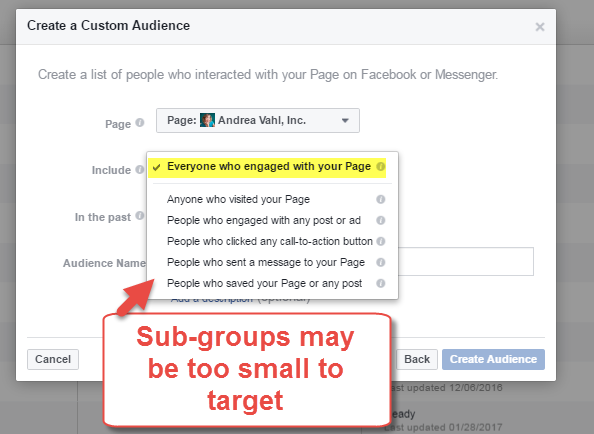
You will also be able to segment your Engagement into just the people who sent your Page a Message, or just the people who visited your Page (but that may be too small a subset to target).

In the past I’ve discouraged people from using the Boost Post option on Facebook for anything other than your current Fans or some other type of warm audience.  The reason is because you are paying for someone to “Like” your Post but then they will never see your Page again.  Now with the Engagement Retargeting, you can reconnect with those people who did interact with your Facebook Post but not Like your Page.

The current options for engagement retargeting are also in place:  Video Views, Canvas, Lead Forms.  These options may or may not be useful if you are not using these features of Facebook.  And even if you are using these features, again, the audience has to be large enough to then target in an ad (typically over 1000 people).

Here is how you create your Audience of engaged users on Facebook.  This feature is currently rolling out and may not be available in all areas.

Create an Audience in the Ads Manager

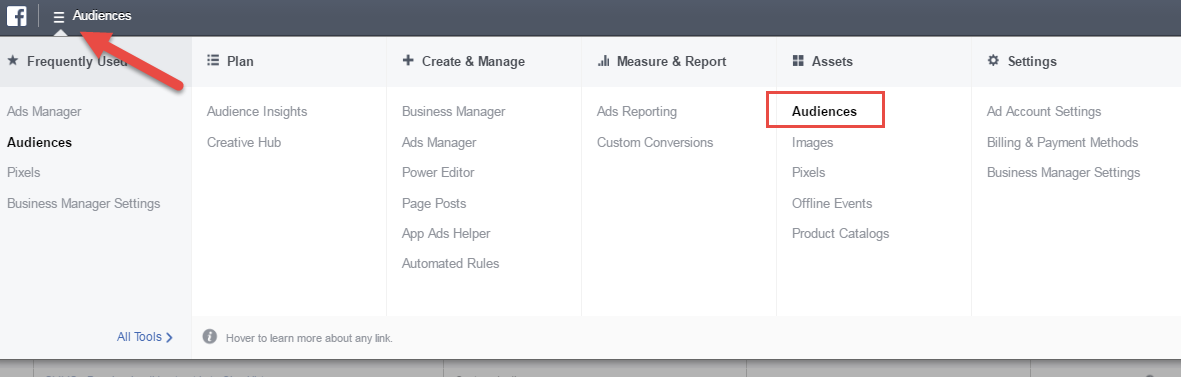
Your first step is to go into Facebook Ads Manager (http://ift.tt/1rOkM6t) and navigate to Audiences from the menu in the upper left corner.  Select Audiences.


Facebook Ads Audiences

Then from the dropdown box, select Custom Audience.

Facebook Custom Audience


From the popup box select Engagement on Facebook.

Engagement Retargeting


Then another popup box will appear and you can see some of the other Engagement Retargeting options you have.  If you don’t have the “Page” option at the bottom, then this feature hasn’t rolled out to you yet.  But if it is available, select it.

Facebook Page Engagement targeting


You will get another popup box which will then have you select the Page and then the audience type.  My suggestion is to only build the “Everyone who engaged with your Page” option unless you truly have a large audience on Facebook and there is some reason you want to segment that audience.


Facebook Engagement Custom Audiences

Name your audience something descriptive so that you can easily use it in your Targeting area of your ads.  This audience will also be available when you Boost Posts straight from your Facebook Page.

The 365 days is the maximum time and it is a rolling period.

Name your Engagement retargeting

Once you create the Audience, it will take some time to build but then it will be ready to use.

Facebook Custom Audiences list


Retargeting Facebook Engagement in an Ad

Now that you have created the Audience, you can use it in the Targeting section of your Facebook Ads.

When  you create an ad, select the name of your Custom Audiences when you are at the Ad Set level.  If you have a lot of Custom Audiences, start typing the name or scroll down.

Select your Custom Audience in Facebook


You can also select your Custom Audience when you are Boosting a Post and now you can reconnect with people who have engaged with your content in the past.  Just click the Boost Post option on the Page and choose the Custom Audience.

Access Custom Audiences from Facebook Boosted Post


I think this new feature is going to be a great way to reconnect with those people who have seen your content for some reason (like a share or an Ad) and interacted with it on Facebook.  Targeted advertising can help save you money by only reaching your warm audience rather than a larger, less specific audience.  Build this Audience now!


If you want to go farther with Facebook Ads, be sure to check out my full Facebook Advertising Secrets course which is amazing – 4 modules covering Facebook and Instagram advertising and a private Facebook Group to ask questions!

facebook advertising course


The post How to Use Engagement Retargeting on Facebook appeared first on Andrea Vahl.


from Andrea Vahl http://ift.tt/2keHjqp

Facebook Ads Case Study: Vital Animals Course Launch

Facebook Ads Case Study - Vital Animals Course Launch

Wondering how to launch your product using Facebook Ads?  Facebook Ads can be a great place to reach your perfect audience and in this case study, you’ll learn some key things you need to have in place before launching your product.

I recently helped Dr. Will Falconer with a Facebook Ad Campaign for his new product, the Natural Rearing Roadmap.  Dr. Falconer is a holistic vet working to educate and empower pet owners about natural remedies and rearing.  His site is the Vital Animal and you can find his Facebook Page here:  http://ift.tt/2jTRAZ5.  He’s also a great guy.

Dr Will Falconer Vital Animals

The campaign and the course sales were a success but it wasn’t only because of Facebook Ads.  Dr. Falconer had a lot of things in place that helped ensure a great launch that I’ll share with you in this article.

Strategy:  Build the Email List with a Series of Freebies

Dr. Falconer was using Jeff Walker’s Product Launch Formula, which I also highly recommend, as a roadmap for his launch.  I recommend you start with the book before diving into the course to make sure it’s right for you.

There were 3 freebies that included a video of Dr. Falconer and a downloadable ebook around 3 topics that directly related to his course:

  • Puppy Immunization Without Vaccination
  • HPP and “Raw” Dog Food – Is Your Raw Food Really Raw?
  • Choosing a Natural Rearing Breeder

He released them about 4 days apart and each freebie had its own landing page where people could sign up.

Then at the end of the freebie promotion, he announced his course and had the doors open for about 5 days.

Checklist to have in place before your Launch

Some of the things that Dr. Falconer had in place to make this launch successful:

  • 3 different freebies to test – that helps ensure more optins and you can then see what your audience finds more appealing
  • Individual landing pages for each freebie
  • Individual Thank You pages for each freebie so we could track the optins.
  • Videos and ebooks were completed ahead of time.  The ebooks or videos weren’t terribly long but they contained valuable information (not just fluff).
  • Facebook Pixel installed on the landing pages and the thank you pages.
  • Time to split test the ads.  This is very helpful if you haven’t run ads before and don’t know your perfect keywords – you need to have some lead time so that there can be a testing phase.

He also had a few bonus things in place that helped the overall launch:

  • A decent amount of web traffic so that we could do retargeting with his ads.
  • An established brand and email list.  This is helpful but not necessary for a good launch.  If you are well-known in your industry you have a warm audience but I’ve also seen launches go well with a cold audience also.
  • An easier target for his product.  We were able to easily find good keywords for his product – dog owners or other Facebook Pages that indicate that a person is interested in holistic vet practices.  Sometimes that can be more challenging for some products.

The Facebook Ads Plan

During the freebie promotional phase, I created a split test plan with several different audiences to start with and used the same ad text and image so that we knew which audience and keywords performed best.  Then once we had the best performing demographics, we tested different images.

Some of the demographics we tested were:

  • Dog owners
  • Raw feeding keywords (an area his target customers are interested in)
  • Lookalike Audiences (to his website traffic and email list)
  • Warm audience who weren’t subscribers already (fans and website visitors)

Here are a few examples of the ads:

Immunization Facebook AdImmunization Facebook Ad2

HPP Facebook AdNatural Rearing Breeder ad


Sales phase: Facebook Ads


We would watch the optins for each stage and make adjustments to the plan based on the results.  Then during the Sales phase we only ran ads to the warm audience except for one ad we ran to the best performing audience to see how that did.

We tested both the best performing image and Dr. Falconer’s image since we were focusing on his warm audience who knew him.

We also ran a “Last Call” ad on the final 24 hours of the sale.


Natural Rearing Roadmap course ad with Dr FalconerLast Call Natural Rearing Roadmap


Facebook Ad Case Study Results

Along the way we saw that the best Freebie was the Puppy Immunization lead magnet – it had the most optins at the lowest cost.

And we tested several images with that lead magnet and found that the 3 puppies together was the best converter.

We tracked the sales from the ads with the Facebook Pixel so we could see those conversions.  But Dr. Falconer also went through the sales and separated those out that had been on his list before so he could see exactly how many sales were truly due to Facebook alone.

  • 10 Sales directly due to Facebook Ads
    (brand new subscribers)

–$997 Course

–Several Assisted Sales (previous subscribers)

  • Resulted in a 221% Return on Ads Investment!  This doesn’t include the assisted sales numbers.

So you can see that Facebook Ads can be a powerful way to help grow your email list and then launch a course. The other benefit is that you find out what demographics respond to your ads and what freebies and topics work best to grow your list.

I hope this has given you some inspiration for your next launch.  Let me know if you have used Facebook Ads in a similar way in the comments below!

And definitely check out Dr. Falconer’s Page and the Vital Animal website if you are an animal lover – he has great advice.


LAST CALL for Lifetime Access to my Facebook Advertising Secrets Course

If you would like to learn how to run Facebook Ads to launch your product, take my online course, Facebook Advertising Secrets.  You can get Lifetime Access to the course materials, the updates and the private Facebook Group where I answer questions.  This offer is good until Friday, February 10th only (and after that there will be a yearly subscription).  It’s at a crazy-good price, too. Sign up NOW!

facebook advertising course


The post Facebook Ads Case Study: Vital Animals Course Launch appeared first on Andrea Vahl.


from Andrea Vahl http://ift.tt/2kEOUTn

How to Create a Social Media Policy for Employees

How to Create a Social Media Policy for Employees

We are living in some challenging times with polarizing view points politically, socially, religiously, and with regards to policies being made in our government.

We often want to express those views on social media. But in these changing times, we can be misunderstood, and occasionally post something that we should have thought through a little more as to how it might be received.

Having a social media policy in place for your company can help protect your brand but also give your employees some good guidelines on what you expect from them, as a representative of your brand.

Not only that, as an employee, you have to protect yourself from the possibility of termination due to a social post that wasn’t well thought through.

Basic Necessities of a Social Media Policy for Employees

I wrote about having a Social Media Policy for your social sites which includes what you will allow on your Facebook Page or in your online community but telling your Employees can post on their personal profiles can feel more restrictive.  But it is necessary as many employees link to your brand in their profiles and thus represent you.

The best way to approach this is to have some guidelines and education around what is acceptable and have conversations with your employees to hear their feedback also.

Here are some basics that every social media policy should cover:

  1. Hate Speech. Make sure you clearly outline that you will not tolerate negative language or insults that are targeted by race, ethnicity, sexual orientation, religion, or physical disability.
  2. Company Secrets or Sensitive Information.  Employees should never discuss or reveal proprietary information about the company, the employees, or the customers online or offline.
  3. Full disclosure that your views are your own.  Many people post that their views are their own in their profiles which is a good thing but does not exempt people from adhering to some of the basic guidelines you put in place.

There are other things that you can add into the policy including what sites people can access while at work, how they can share the company news (from blog posts or press releases), and how to associate their profiles with the companies.

There are some great posts about this that cover employee policies that I used as reference:

What about Free Speech?

One of the issues that is central to this problem is Free Speech.  Aren’t we able to say what we want on our personal profiles in our spare time?

The short answer is no.  An American Bar article about free speech for employees states:

American employees’ free speech rights may be more accurately summarized by this paraphrase of a 1891 statement by Oli­ver Wendell Holmes, Jr.: “A employee may have a constitutional right to talk politics, but he has no constitutional right to be employed.” In other words: to keep your job, you often can’t say what you like.

We are in an “employment at will” model and the First Amendment only limits the government’s ability to suppress free speech.  The article goes on to talk about the fact that some unions may have clauses in place but most private sector jobs do not.

Also note that some states do have some protections for employees off-duty legal activities so check your local laws and consult with a lawyer if you are in this type of situation.

How to Protect Yourself as an Employee

It is important to remember as an employee that you ALSO need to protect yourself. The list is getting longer every day of people who were fired for a tweet meant as a joke, a Facebook post gone wrong, or in some cases very real hate speech.

Many times people are alerting the brand or company of the employee’s posts – the SNL writer had nearly 79,000 people who signed a petition demanding that she be fired.

Recently, a friend of mine posted a political image with what was intended to be a joke but was perceived by many as rude and divisive.  She is part of a large online company and there was a heated discussion on her post about whether or not this was appropriate.  While she stated that it was her personal profile, the fact is, she is thought of as a part of that brand and it caused hurt feelings.  The brand was contacted and she did take the post down.

We can argue all day about whether it’s right or wrong for someone to contact your employer about your personal posts but the larger issue is that that people are feeling extremely sensitive to any political posts.  Both sides of the issue are feeling that the other side is belittling, bullying, and calling each other names.   And they are right – I’m seeing so much negativity on both sides.

As an employee you have to think about whether that social media post is worth your job. And deleting it right away won’t always protect you in the world of screenshots.

If you have to ask yourself if the post is appropriate, then it may not be.  Are you coming from a place of anger or a place of love?

When You ARE the Brand

As an employee, you may be more associated as a “brand manager” than some other employees but as shown with the nurse of the hospital, no position is safe from scrutiny (again whether this is right or wrong, I don’t have an answer).

You also have to realize what responsibility you carry since your profile can be directly tied to your employer or tied to your own business.

Personal profile tied to company


Some things to consider that may make your personal posts carry more weight towards being a part of the brand:

  • Is the company smaller?  Fewer employees may mean that you have a more customer-facing role.
  • Are you creating content for that company that people associate with your personal name?  This includes blogging, video, social posts, and participating as the voice of the company inside groups.
  • Are you in a customer service or sales role?  Customers who regularly talk to you will associate your opinions with the feeling they have for the company.
  • Are you the owner?  Sometimes you have more leeway as the owner because you get to decide how much you let your customers know your personal views.  But realize that you may lose customers who don’t agree with your opinions if you choose to be more vocal about your personal views.  That may be ok with you.

The Problem with Humor

Humor is very subjective and can cause so many problems with interpretation.  I’m a stand up comedian and a little bit of a student of humor – I’m fascinated by what makes something funny.

I personally prefer self-deprecating humor when I’m saying ridiculous stuff about my self but I understand that sometimes that can be considered “playing it safe” because no one is offended.

Typically people get into trouble with making sweeping generalizations about a group of people and putting them down.  Sometimes that can work if you are also a part of that group.  Minorities can often talk about their own group with generalizations that people outside that minority can’t say because it would be offensive.  Chris Rock has a lot of funny jokes that would NEVER fly if a white person said them.

When you are considering political humor and posting it on social media, who is going to find that joke funny?  Probably people who think exactly like you do.  Who might be offended by that joke?  Probably people who are on the other side of that issue.

What I would recommend is only sharing those types of jokes to people who know you best and understand your intentions.  Create a Friends List with a smaller group (but don’t forget the screenshot issue):  http://ift.tt/1JNDzou

Create a Friends List

Or just email the funny post to your besties if you need to share.


Final Thoughts

So what to do?  Should we post things so benign so we never risk any offense?  No I don’t think that’s the answer either.  But maybe that’s the answer for awhile.

Let’s try, at least for awhile, to try and come together.  Let’s ask ourselves, is this post going to divide or is it going to unite?

In understand that sometimes we need to take a stand on issues we are passionate about.  And posting something about what you are doing about an issue (ie. I’m calling my senator, I’m marching, I’m voting, I am putting together a petition) is much less inflammatory than calling each other names.

I think as an employee and an employer we need to protect our personal brands and our company brands.  I don’t think there are easy answers to how to stand for what we believe in, have a voice, and also never offend.  But I do think that we all need a little more kindness and gentleness right now.


I’d love to hear your thoughts on this without this being a political discussion.  Please feel free to share your respectful thoughts below.

The post How to Create a Social Media Policy for Employees appeared first on Andrea Vahl.


from Andrea Vahl http://ift.tt/2kpMVTx

Facebook Marketing: A Daily, Weekly, and Monthly Checklist

Facebook Marketing Checklist

Do you need a concise checklist to make sure you are getting the important marketing tasks done on Facebook?  If you are anything like me, you like to cross things off your to-do list and Facebook can be a distracting place – wait, why was I here again?

Use this marketing checklist as a guide for your daily, weekly, and monthly tasks.  You may have a slightly different schedule or you may have additional things to add to it when you have a new campaign.  I have the general list first and then add some screenshots for added explanation.

Facebook Daily Tasks

  1. Create and schedule posts for the day, or check the scheduling system you are using to make sure posts are going out.
  2. Check the Notifications tab on Facebook, or the 3rd party dashboard if you are monitoring Facebook a different way.
    1. Like and Reply to comments on your posts.
    2. Like or comment on any shared posts.
    3. Reply to comments on your Timeline (Mentions).
    4. Remove any spam comments or spam posts.
  3. Check Page Messages and respond if you have the Messages button open.
  4. Check Facebook Ads if you are running an active advertising campaign (you may want to do this 2x or 3x per day depending on your budget).

Facebook Weekly Tasks

  1. Comment on other targeted Page Posts for added visibility.  Check the Pages Feed and see if there are any recent posts you can comment on to enhances your visibility with your target audience.
  2. Quick Review of Posts that are getting more Reach and Engagement in Post Insights area and possibly adjust what you post if certain things are getting more engagement.
  3. Share any important posts to your personal profile
  4. Post in any Facebook Groups you participate in regularly
  5. Plan any video content (Live or uploaded pre-recorded video)
  6. Create images for posts – I often use Canva or Snagit to create images for Facebook.

Facebook Monthly Tasks

  1. Do a deeper dive into Facebook Analytics to see what worked that month.
  2. Do a review of ongoing Facebook Ad Campaigns.
  3. Outline content for the upcoming month with any marketing initiatives.

Facebook Marketing Checklist explained

Here’s a visual aid for some of the tasks so you know exactly how to do them.

Create and schedule posts

You can schedule posts right from your Timeline or from your Scheduled Posts area in the Publishing Tools section.  Just create the post like normal and select the down arrow to the right of the Publish button.  Then select Schedule.

Scheduling a Facebook Post

Choose the time and date you want the post to be published.

Publishing Schedule Facebook

You can see all your upcoming scheduled posts either from your Timeline or in the Publishing Tools area.

Scheduled Facebook Posts


Publishing Tools Facebook

Make sure you have a good Facebook editorial calendar that you are working with so you don’t have trouble coming up with content every day.


Check the Notifications tab on Facebook

Make sure you are responding to comments, likes, and shares on your Facebook Page.  The response may be as simple as Liking their comment as acknowledgement or you may want to reply.

Facebook Notifications tab

Filter by Comments so that you can easily respond to those and see if there are any spam comments.  If there are Mentions, those show up as tags on your Facebook Timeline under the Visitor Posts area.

Sometimes there is spam there and you can remove the spam (and ban the spammer if necessary).  Visitor Posts will not be very visible to your Fans – they are only visible if your Fans come to the Page and look at the Visitor Posts.

Visitor Posts on Facebook


Check Page Messages

Messages on your Page are only valid if you have the Message button open.  Make sure you are responding to Messages promptly (if you aren’t responding, you can disable the Message button)

Message indicator on Facebook


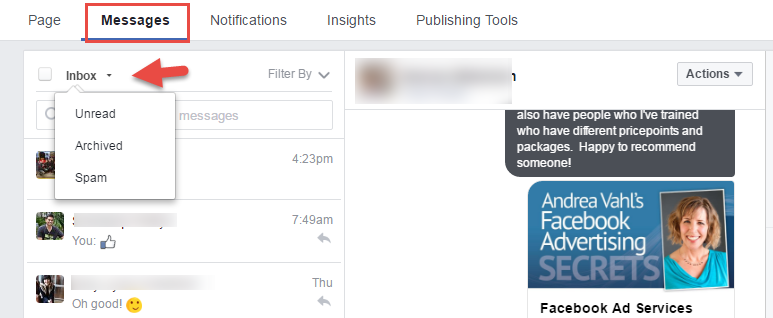
You can filter by Unread Messages or archive the messages to keep your inbox “cleaner”


Facebook Messages


If you aren’t going to answer messages on your Page or check them often, turn the Messaging capability off in the Settings area.

Facebook Message setting


Check Facebook Ads

If I have an active campaign, I’m typically checking my Facebook Ads area at least twice a day to make sure the ads are performing well and sometimes more.  I start by looking at a longer time frame like a week, and then compare the performance of today and yesterday to see what the trend is with the cost per click, CTR, and conversions (if applicable).

Use my post on Facebook Ad Reports to make sure you are setting up the columns correctly to view the right data.

Facebook Ad comparison


Comment on other targeted Page Posts for added visibility

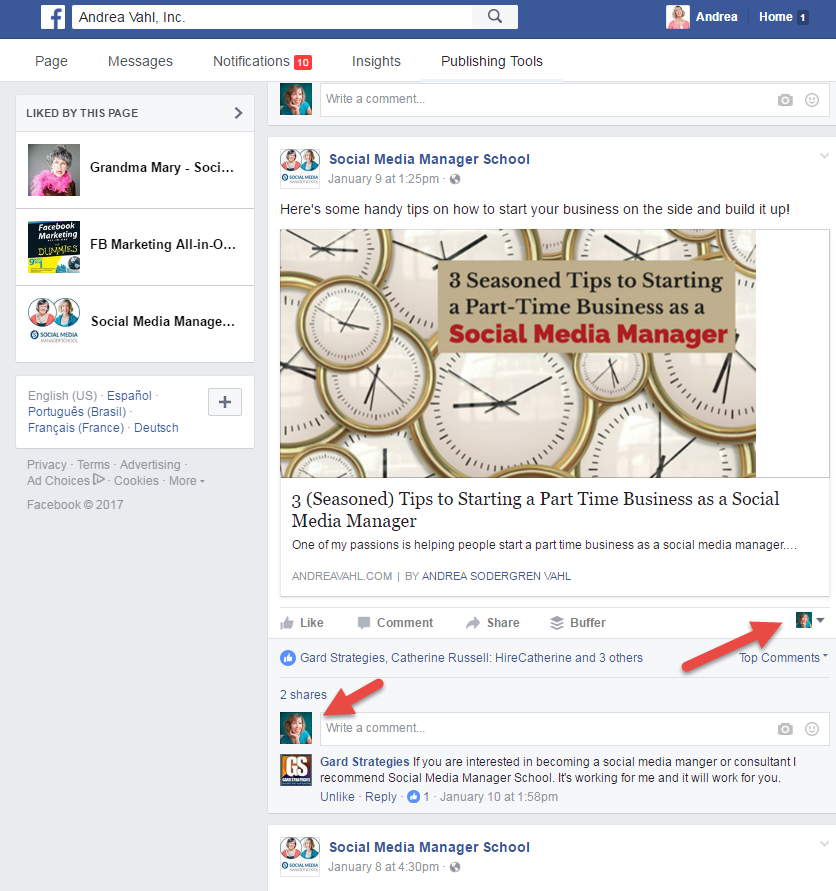
Commenting on other targeted Pages as your Page is a good way to get more organic visibility.  If you have Liked other Pages as your Page, you can use the Pages Feed area to see the recent posts from those Pages.

Access Facebook Pages Feed

Then just comment on some of the most recent posts with something that adds to the conversation (not promotional). Obviously in this case I wouldn’t since this is my own Page (I would be talking to myself and that would be weird)

Comment on Pages as your Page

You can also navigate directly to a Page and adjust how your commenting.  Choose a post that is more recent.

Comment as your Facebook Page

This strategy is a little more work than just using Facebook ads but it’s a free method to be more visible with your target audience.


Quick Review of Posts that are getting more Reach and Engagement in Post Insights area

I like to review what types of posts are doing well in my Insights area so I can make sure I use similar types of posts (or plan on re-posting the posts) that get good engagement.

Switch to Engagement Rate for a more equal view of each post.  Engagement Rate shows you the percentage of engagement the post got from the people who saw the post (the Reach).

Facebook Page Post Engagement

Watch what is normal for your Page – typically for me, anything over 5% is good and it can depend on the size of your Page.


Share any important posts to your personal profile

I also look at the posts that are doing well on my Page and if it’s getting good engagement there (or it’s something important), I will share it to my personal profile.  I only do this a couple times a week to give those posts better visibility.

Share from your Page to your Profile

Post in any Facebook Groups you participate in regularly

Participating in Facebook Groups is a great way to network with others.  Be visible by commenting or posting but make sure you are following the Group’s rules and not spamming.

I either use my Shortcuts to see my most frequently used Groups.

Edit Facebook Shortcuts

When you go to all your Groups, you can easily see which ones have new content that you may need to read.

Facebook Groups


Do a deeper dive into Facebook Analytics

Then once a month or once a quarter, it’s good to do a deeper dive into Facebook Analytics by downloading all your posts.

Facebook Insights

Facebook Post Level data

Make sure you read my post on exactly what I look for when I do a deep dive: Facebook Insights


So that all might sound like a lot to do but if you get into a habit of doing these activities, you can get them done in 5-10 minutes a day and then a longer session once a week of 10-20 minutes.  And when you start seeing the benefits of more connections and a return on your investment of time, then these marketing activities become worthwhile.

How about you, what types of Facebook activities do you do on a daily, weekly, and monthly basis?  Share your thoughts in the comments below!

Social Media Manager School

Interested in more social media goodness?  This is exactly the type of information we share in Social Media Manager School!  We have training and strategy on each of the major social media sites.  Find out more and join the course at http://ift.tt/WtCopL


The post Facebook Marketing: A Daily, Weekly, and Monthly Checklist appeared first on Andrea Vahl.


from Andrea Vahl http://ift.tt/2jEBsOJ

Latest Posts